![arborgold-logo-@250px copy.png]](https://help.arborgold.com/hs-fs/hubfs/arborgold-logo-@250px%20copy.png?height=40&name=arborgold-logo-@250px%20copy.png)
The Arborgold Crew App now supports Two-way texting, allowing crew members to send and receive Text messages directly with customers. This feature was previously available only for cloud roles and is now integrated into the Crew mobile experience.
This article explains how to use 2-way texting, start conversations, and manage ongoing message threads.
Overview: What Is Two-Way Texting?
Two-way texting allows crew members to communicate directly with customers via SMS from within the Crew App.
Key benefits include:
-
Faster communication with customers in the field
-
Real-time replies visible to crew users and admins
-
Centralized conversation history per customer
-
Ability to send photos and custom messages
Each conversation is tied to a specific customer and is shared with admins and other authorized users within the same database.
On-My-Way Texting
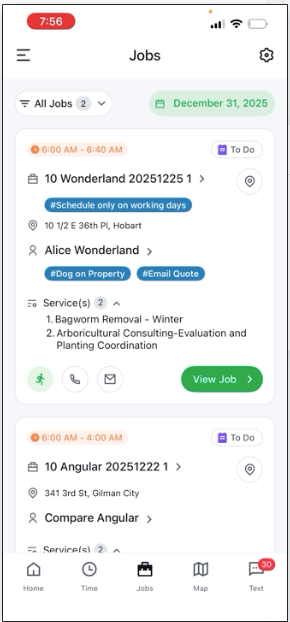
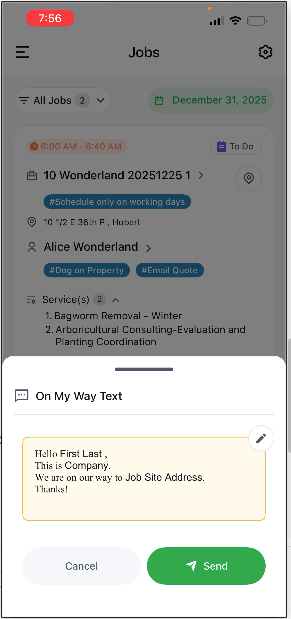
Crew members can quickly send predefined or custom “On-My-Way” style messages to customers.
-
Messages are sent as SMS.
-
A conversation thread is automatically created.
-
All replies from the customer appear in the same conversation.
-
Admins in the same database can also view the conversation.
This ensures visibility and continuity across your team.
Accessing the Text Conversations Tab
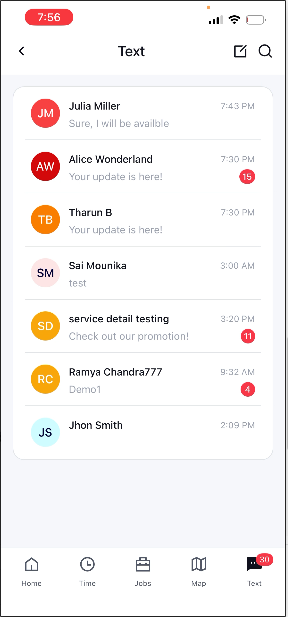
A dedicated Text Conversations tab is available in the bottom-right area of the app.
From this tab, you can:
-
View all existing conversations
-
Search by customer name
-
Search by text content
-
Quickly open and continue previous conversations
This makes it easy to manage multiple active conversations in one place.
Starting a New Conversation
To initiate a new text conversation:
-
Open the Text Conversations tab.
-
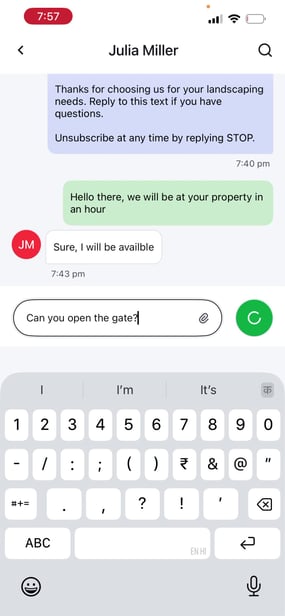
Select the option to start a new chat.
-
Search for and select a customer.
-
Confirm the customer has:
-
A phone number on file
-
SMS enabled
-
-
Begin typing your message and send.
Once sent, the conversation will remain available for future reference.
Feedback and Next Steps
We encourage all users to try the new Two-way texting feature in Arborgold Crew 2.3.0. Your feedback helps improve communication workflows and future enhancements.
If you have questions, issues, or suggestions, please contact support or share feedback with your Arborgold representative.