![arborgold-logo-@250px copy.png]](https://help.arborgold.com/hs-fs/hubfs/arborgold-logo-@250px%20copy.png?height=40&name=arborgold-logo-@250px%20copy.png)
This article provides a clear overview of recent bug fixes, feature enhancements, and product improvements included in the 10.9 release, organized by feature module.
✨ Notable Feature Enhancement:
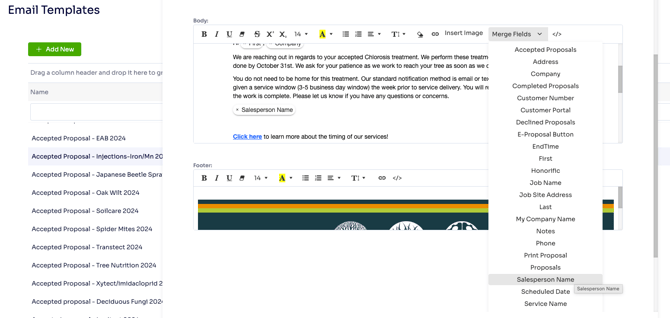
- AJTA-21839 – Added Salesperson Name Merge Field to Automated Email Templates: Added a Salesperson Name option to the Merge Fields picker in automated email templates so a single template can address every recipient's actual salesperson by name.
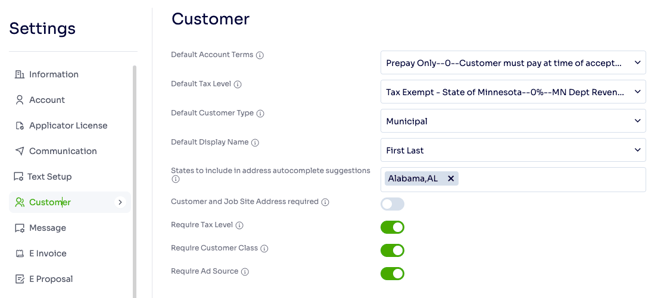
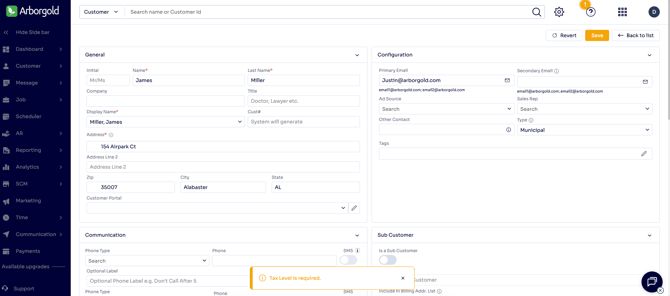
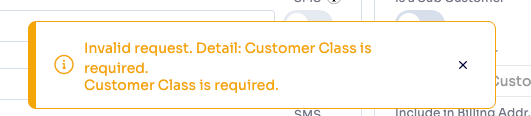
- AJTA-21848 – Added Configurable Tax Level Requirement Settings: Added customer-level settings to control whether Tax Level, Customer Class, Ad-Source are required on customer records, laying the groundwork for enforcing that requirement on the customer form before saving.

🐞 Bug Fixes
Jobs, Services & Scheduling 💼
- AJTA-21110 – Job Info Screen: Service Details Navigation and Save Button Issues: Fixed multiple issues on the Job Info screen where double-clicking a line item to open Service Details didn't work until the job was saved, navigation arrows were missing, and the Save button didn't always indicate unsaved changes. All three behaviors are now corrected.
- AJTA-22292 – Save Button Intermittently Not Activating on Job Page: Fixed an issue where the Save button on the Job page sometimes did not turn yellow after an edit, preventing changes from being saved. Edits now reliably activate the Save button.
- AJTA-21648 – Measurement Value Not Copied From Ongoing Service to Scheduled Children: Fixed an issue where scheduling children of an Ongoing Indefinite Sliding Scale service copied the price but not the manually entered measurement value. Both now copy correctly to all children.
- AJTA-21684 – Skip-Rescheduled Services Missing From Work Scheduler Pending Orders: Fixed an issue where services set to Skip-Reschedule did not return to the Work Scheduler pending orders queue. They now appear correctly so they can be rescheduled.
- AJTA-21745 – New Jobs Not Populating Default Ad Source: Fixed an issue where adding a new job from the Customer All Jobs screen left the Ad Source field blank instead of using the customer's default. The field now populates automatically.
- AJTA-21798 – New Job Not Opening After Creation: Fixed an issue where creating a new job left the user on the All Jobs list instead of opening the new job. The app now navigates directly to the new job's detail page.
- AJTA-21946 – Service Price Changing Incorrectly After Job Completion: Fixed an issue where a completed service priced by Estimated Resource had its price incorrectly changed after completion. Completed services now retain their correct calculated price.
- AJTA-22132 – Skip-No-Reschedule Services Still Appearing on Printed Work Orders: Fixed an issue where services flagged as Skip No Rescheduled still appeared on printed Work Orders. These services are now excluded from the printed output.
- AJTA-22151 – Satellite Imagery Not Loading on Job Site Map: Fixed an issue where the satellite view on the Job Sites map did not render at the default zoom level. The map now loads correctly without requiring the user to zoom out.
- AJTA-22212 – Proposals Merge Field Not Working in Batch Communication: Fixed an issue where the Proposals merge field did not work when sending batch email communication from the Proposals tab. The merge field now works correctly in batch sends.
AR / Payments & Invoicing 💳
- AJTA-21382 – Job Costing Page Scrolling to Bottom After Posting: Fixed an issue where the Job Costing page automatically scrolled to the bottom after posting an RTI. The page now stays in place.
- AJTA-21679 – E-Statement Email Transaction Sort Order Mismatch: Fixed an issue where the transaction order in E-Statement emails did not match the order shown in Arborgold. The email now displays transactions in the same order.
- AJTA-21765 – Invoice Not Calculating Sales Tax for Former Sub-Customers: Fixed an issue where invoices for customers previously linked as sub-customers did not calculate the correct sales tax or display the correct billing address. Both now calculate correctly.
Messaging & Communications 💬
- AJTA-21538 – Marketing Automation Campaigns Failing to Save: Fixed an issue where users could not create or save automation marketing campaigns. Campaigns now save successfully.
- AJTA-21678 – Outbox Email ID Column Filter Not Working: Fixed an issue where the Email ID search/filter box in Communication > Outbox did not filter results. The filter now correctly narrows the list by Email ID.
- AJTA-21741 – Job Automation Follow-Up Emails Sending as Duplicates and Off-Schedule: Fixed an issue where job automation follow-up emails were sometimes sent twice and calculated timing from the wrong reference date. Emails now send once and follow the configured schedule from the proposal creation date.
Reporting & Analytics 📊
- AJTA-21447 – Plant Inventory Analytics Report Showing No Data: Fixed an issue where the Plant Inventory Analytics report displayed "No Data Found" even when inventory data had been entered. The report now correctly displays all entered data.
Integrations 🔗
- AJTA-20184 – QuickBooks Desktop Write Checks Export Requiring Multiple Attempts: Fixed an issue where payments exported to QuickBooks Desktop via Write Checks did not complete on the first attempt, requiring multiple exports. Payments now export successfully on the first try.
- AJTA-21623 – QuickBooks Export From Customer AR Failing: Fixed an issue where exporting invoices from the Customer AR screen to QuickBooks returned "Nothing to process" and failed to export. Exports now complete successfully.
- AJTA-22003 – Batch Invoice Exports to QuickBooks Requiring Repeated Retries: Fixed an issue where invoices and payments exported to QuickBooks Desktop repeatedly failed and required multiple retries before succeeding. Exports now complete reliably on the first attempt.
🚀 Product Improvements
Jobs, Services & Scheduling 💼
- AJTA-22161 – Scheduled Hours Not Recalculating When Employees Are Added or Removed: Fixed an issue where enabling Recalculate Scheduled Hours in the Work Scheduler did not update scheduled hours when employees were added or removed. Hours now recalculate correctly.
- AJTA-22166 – Work Scheduler Saved Filters Shifting Accepted Date and Showing False Unsaved-Changes Prompt: Fixed two issues with Work Scheduler saved filters: reapplying a saved filter shifted the Accepted Date back a day, and an "Unsaved Filter Changes" prompt appeared even when nothing had changed. Both now behave correctly.
- AJTA-22191 – Job Renewals Generation Intermittently Failing With Timeouts: Fixed an issue where generating Job Renewals intermittently took an unusually long time and failed with execution errors. Renewal batches now generate reliably.
- AJTA-22238 – New Job Inheriting Status Instead of Defaulting to Proposal: Fixed an issue where creating a new job from an existing Job Info screen inherited that job's status instead of defaulting to Proposal. New jobs now correctly default to Proposal status.
- AJTA-22173 – Confusing Validation Message When Scheduling Unsaved Services on a Proposal: Fixed an issue where attempting to schedule unsaved services on a job in Proposal status showed a misleading error about service statuses. Users are now clearly told to save changes or that scheduling requires Work Order status.
AR / Payments & Invoicing 💳
- AJTA-21742 – Invoice Email Address Not Cleared When Option Disabled: Fixed an issue where the email address field in Customer Details remained populated after "Send Invoices to this Email" was disabled. The field is now cleared when the option is turned off.
-
AJTA-20103 – Improved Adyen Processing Fee Recording and Exporting: Improved how Adyen processing fees are recorded and exported for more accurate and reliable fee tracking.
Messaging & Communications 💬
- AJTA-22144 – Job Automation Send Date and Follow-Up Time Showing 12:00 AM: Fixed an issue where the Send Date and Next Follow-up Date on the Job Automation tab displayed 12:00:00 AM instead of the correct time.
Settings & Configuration ⚙️
- AJTA-21776 – Crew Resource Changes Saved Even When Update Popup Is Closed: Fixed an issue where crew resource assignment changes were saved even after closing the Update Resources popup without clicking Update. Closing the popup now correctly cancels the change.
- AJTA-22185 – Unable to Consistently Delete Tags: Fixed a backend error that intermittently prevented tags from being deleted across the application. Tag deletion now completes successfully every time.
Integrations 🔗
- AJTA-22168 – Credit Memo Payment Export Logging False Error Despite Success: Fixed an issue where a successful Credit Memo payment export to QuickBooks Desktop was incorrectly logged as an error due to a missing transaction ID in the response. Successful exports are no longer flagged as errors.
Chemicals & Materials ⚗️
- AJTA-21750 – Customer Name Truncated in Copy Plant Inventory & Custom Measures Popup: Fixed an issue where customer names were truncated in the Copy Plant Inventory & Custom Measures popup. The full customer name now displays correctly.
Performance & Stability 🏎️
- AJTA-21799 – Delay Navigating to Recurring Visits Screen in Work Scheduler: Fixed an issue where selecting Recurring Visits in the Work Scheduler took several seconds to respond. Navigation is now immediate.
- AJTA-22054 – Page Becomes Unresponsive When Loading Large Record Sets: Fixed an issue where the page became intermittently unresponsive while loading very large filtered record sets. Large result sets now load without freezing the page.
- AJTA-22075 – Weather Tracking on Clock-In Causing False Clock-In Failures: Fixed an issue where a weather-service outage could cause crew members to see a false "clock-in failed" error even though the clock-in succeeded. Clock-ins no longer fail due to weather-tracking errors.
- AJTA-22076 – Weather Tracking on Clock-In Causing Duplicate Calls and Missing Web Support: Fixed an issue where weather tracking on clock-in made redundant calls on mobile and wasn't supported on web at all. Weather tracking now runs once per clock-in and works consistently across mobile and web.
We value your feedback! If you have questions or encounter any issues, please reach out to our support team.