![arborgold-logo-@250px copy.png]](https://help.arborgold.com/hs-fs/hubfs/arborgold-logo-@250px%20copy.png?height=40&name=arborgold-logo-@250px%20copy.png)
This article provides a clear overview of recent bug fixes, feature enhancements, and product improvements included in the 10.7 release, organized by feature module.
🐞 Bug Fixes
Jobs, Services & Scheduling 💼
- AJTA-13260 – Plant Exploration Data Not Loading Correctly: Fixed multiple issues where Plant Inventory exploration data failed to populate and display correctly.
- AJTA-18608 – Work Scheduler Routing Error Resolved: Fixed an issue where users received an unknown error when attempting to route in the Work Scheduler.
- AJTA-18609 – Timesheet GPS Location Displaying Incorrectly: Fixed an issue where the Timesheet GPS tracking displayed employee locations in incorrect geographic regions.
- AJTA-19671 – Duplicate Employee Resources Being Added Automatically: Fixed an issue where duplicate or unknown employee resource records were being added automatically without user action.
- AJTA-19968 – Summary of Service Time Shows Incorrect Dates for Multi-Day Jobs: Fixed an issue where the Summary of Service Time displayed an incorrect date for jobs that started on one date and were completed on another.
- AJTA-20271 – Mouse Scroll Unintentionally Changing Service Resource Est Qty: Fixed an issue where scrolling the mouse wheel inside a Service Resource Est Qty field changed its value unintentionally.
- AJTA-20299 – Previously Added Material Disappears When Creating New Material Without Saving: Fixed an issue where adding a new material to a service resource without saving first caused a previously added material to disappear.
- AJTA-20464 – Service Item List Not Sorted Alphabetically: Fixed an issue where service items within a service line were displayed in random, non-alphabetical order.
- AJTA-20692 – Mixture Batch Action Failing to Update Job and Service Status: Fixed an issue where the 'Add Items to Mix' Mixture Batch Action failed to update the Work Order or service status for Pending and Scheduled services.
- AJTA-20753 – Batch Service Update Timing Out When Applying New Default Resources: Fixed an issue where using 'Update All Active Services' after changing default materials on a service caused a timeout and failed to apply updates.
- AJTA-20756 – Sliding Scale Calculation Failing with Manually Entered Square Footage: Fixed an issue where manually entering square footage on a service without a default site measurement caused the Sliding Scale calculation to fail.
- AJTA-20787 – Scheduler Advanced Service Filter Returning Incorrect Results: Fixed an issue where the Advanced Service Filter in the Scheduler was not returning the expected filtered set of services.
- AJTA-20847 – Mixture Material Updates Not Saving in Crew App After 'Update Services': Fixed an issue where mixture material updates added in the Crew App disappeared and were not saved after tapping 'Update Services'.
- AJTA-20880 – Material Actual Quantity Auto-Filling When Service Is Scheduled: Fixed an issue where the Material Actual Quantity field was automatically pre-populated when a service was scheduled. The field now remains empty until manually entered.
- AJTA-20900 – Geocode All Sites Tool Returning Confirmation Without Geocoding: Fixed an issue where the 'Geolocate All Sites' tool in the Group Scheduler returned an OK status without actually geocoding any sites.
- AJTA-21065 – Error Saving Time Track Entries on Jobs: Fixed an issue where saving Time Track entries on jobs resulted in an error, preventing users from logging time correctly.
- AJTA-21081 – Plant Inventory '+' Button Locking Job and Deleting Service Before Save: Fixed an issue where clicking the '+' button to add plant inventory before saving a service caused the job to become locked and the service to be deleted on page refresh.
- AJTA-21110 – Multiple Functional Issues on Job Info Screen: Fixed multiple issues on the Job Info screen, including service details opening in read-only mode on double-click and the Save button not behaving correctly.
- AJTA-21175 – Invoicing First Service Line Auto-Scheduling Subsequent Lines: Fixed an issue where invoicing the first service line in a job automatically scheduled subsequent service lines without user action.
- AJTA-21206 – Services Cannot Be Saved on Job Information Screen: Fixed multiple issues on the Job Information screen where services could not be saved, including missing error messages, broken page scrolling, and job status changes not working with invoicing in one step.
- AJTA-21228 – Services Tab Failing to Load Reliably on Customer Profile: Fixed an issue where the Services tab on the Customer Profile was glitching on load, requiring multiple attempts to display services with incomplete data and filter issues.
- AJTA-21249 – Job Screen Tax Rate Column Showing Incorrect Decimal Placement: Fixed an issue where the tax rate column on the Job screen displayed rates with incorrect decimal placement compared to values shown on invoices.
- AJTA-21252 – Job Costing Dollar Totals Fluctuating While Scrolling: Fixed an issue where Price, Cost, and Profit totals at the top of the Job Costing screen changed unexpectedly as the user scrolled through records.
- AJTA-21253 – Service Line Prices Missing Thousands Comma Separator on Job Screen: Fixed an issue where service line prices on the Job screen were displayed without a thousands comma separator.
- AJTA-21344 – Material Unit of Measurement Invisible in Work Scheduler Resources: Fixed an issue where the unit of measurement text for material resources in the Work Scheduler was invisible due to white text on a white background.
- AJTA-21345 – Batch Invoice Action Failing When Combined with Job Status Change: Fixed an issue where changing Job Status to 'Completed' and using the 'Invoice' batch action simultaneously caused only one of the two actions to complete.
AR / Payments & Invoicing 💳
- AJTA-18829 – Invoice Totals Off by a Cent in Pre-Invoicing: Fixed an issue where invoice totals were off by one cent when using the pre-invoicing feature.
- AJTA-20633 – Invoice Missing from Customer AR Tab: Fixed an issue where a batch invoice appeared in the main Invoices list but was missing from the customer's AR tab.
- AJTA-20825 – Batch Invoicing Failing and Timing Out for Large Batches: Fixed an issue where batch invoicing failed with errors for large batches, including the Invoice & Communicate function.
- AJTA-20881 – Surcharge Not Applied to Invoices During Batch Invoicing: Fixed an issue where the configured credit/debit convenience surcharge was not applied to certain invoices during batch invoicing.
- AJTA-20976 – AR Statements Showing Customers with $0.00 Balance: Fixed an issue where the AR Statements screen was displaying customers with a $0.00 balance who should not have appeared.
- AJTA-21075 – Tax Rate Applying Rounded Value Instead of Exact Configured Rate: Fixed an issue where invoices and proposals applied a rounded tax rate instead of the precisely configured rate (e.g., 15% instead of 14.975%).
- AJTA-21325 – Bulk Invoice Export to QuickBooks Online Failing: Fixed an issue where attempting to bulk export invoices to QuickBooks Online resulted in an error and no invoices were transferred.
Messaging & Communications 💬
- AJTA-20141 – Unexpected Members Auto-Added to Two-Way Text Conversations: Fixed an issue where other team members were automatically appearing in new two-way text conversations without being added by the user.
- AJTA-20554 – SMS Notification Badge Firing for Outgoing Messages: Fixed an issue where text notification badges were triggered for outgoing messages. Notifications now only appear for incoming messages.
- AJTA-20642 – Proposal Accepted Email Showing Inactive Jobs in Merge Fields: Fixed an issue where the Proposal Accepted email merge field included deactivated or inactive jobs in customer-facing emails.
- AJTA-20724 – Quotation Marks and Apostrophes Adding Extra Characters in Messages: Fixed an issue where quotation marks and apostrophes in messages and appointment notes caused extra unintended characters to be inserted.
- AJTA-20752 – SendGrid Failure Message Column Showing 'Null' for Successful Emails: Fixed an issue where the Failure Message column in SendGrid communication records showed 'null' for emails that were successfully delivered.
- AJTA-20765 – Crew App E-Invoice Merge Field Rendering as Plain Text in Emails: Fixed an issue where the e-invoice merge field in emails sent from the Crew App rendered as plain text instead of a clickable button.
- AJTA-20767 – HTML Tags Appearing in Recipient Two-Way Text SMS Messages: Fixed an issue where recipients of two-way text messages received raw HTML tags visible in their SMS content.
- AJTA-20769 – Company-to-Customer Text Messages Not Being Delivered: Fixed an issue where text messages sent from the company to customers were not being delivered.
- AJTA-20790 – Two-Way Texting SMS Messages Intermittently Failing to Send: Fixed an issue where some SMS messages via Two-Way Texting showed as 'Failed' even when the customer had texting permission enabled.
- AJTA-20866 – Communication Failure Message Column Showing 'Null' Instead of Blank: Fixed an issue where the Failure Message column displayed 'null' instead of remaining blank when no delivery failure had occurred.
- AJTA-20985 – Random Characters Appearing in Messages When Saving: Fixed an issue where saving messages caused random or incorrect symbols to be inserted into the message content.
- AJTA-21000 – Duplicate SMS Appointment Reminders Being Sent to Customers: Fixed an issue where automated SMS appointment reminders were being sent twice to customers.
- AJTA-21020 – Two-Way Texting Customer Lookup and Thread Management Issues: Fixed multiple issues in Two-Way Texting, including customer lookup failing when searching by company name, thread display problems, and message counters not resetting after opening a thread.
- AJTA-21195 – Message and Appointment Formatting Erased When Saving: Fixed an issue where text highlighting and formatting in messages and appointments were erased upon saving.
Customers & Contacts 👥
- AJTA-19820 – Customer Portal Displaying Incorrect Job Totals: Fixed an issue where the Customer Portal excluded recurring service prices from the displayed job total, resulting in an understated balance.
- AJTA-20293 – Deactivated Employees Appearing in Customer Activity Log: Fixed an issue where deactivated employees continued to appear in customer activity records after being deactivated.
Chemicals & Materials ⚗️
- AJTA-20901 – Inventory Stock Reorder Level Columns Not Reflecting Material Settings: Fixed an issue where the Reorder Level columns on the Inventory Stock screen did not reflect the reorder settings configured at the material level.
Reporting & Analytics 📊
- AJTA-20977 – Last Visit Column Displaying Incorrect Value in Schedule View: Fixed an issue where the 'Last Visit' column in Schedule view showed an incorrect number of days since the most recent completed visit.
🚀 Product Improvements
Jobs, Services & Scheduling 💼
- AJTA-19358 – App Scheduler Warning Message Clarity Improved: Improved the warning message displayed when moving tasks to a different date in the App Scheduler to be clearer and more understandable.
- AJTA-20235 – Plant Inventory Tags Now Copied with 'Copy Selected' Action: Resolved an issue where PI Tags were not copied along with plant inventory records when using the Copy Selected action.
- AJTA-20244 – File Selection Cleared After Sync Action: Resolved an issue in the Files tab where file selections were not cleared after a Sync action, preventing unintended deletes or downloads on other records.
- AJTA-20610 – Timesheet and Job Costing Hours Now Match: Resolved an issue where hours shown on the Timesheet screen did not match hours in Job Costing for the same job and date range.
- AJTA-20646 – Job Site Deactivation Stays on Job Info Screen: Resolved an issue where deactivating a job site from the Job Info screen redirected users to the Address List instead of remaining on the current screen.
- AJTA-20658 – Completed Date Now Shows Correctly After Service Completion: Resolved an issue where marking a service as complete from Service Resources initially displayed the Scheduled Date instead of the actual Completed Date.
- AJTA-20670 – Time Track No Longer Shows Incorrect Hours When Clock In Is Empty: Resolved an issue where leaving the Clock In time empty in Add Time Track caused the Total Hours field to display an extremely large incorrect value.
- AJTA-20925 – Deleted Time Activity Records Can Now Be Restored: Resolved an issue where restoring deleted or archived Time Activity records resulted in an error caused by an outdated column reference in the restore endpoint.
- AJTA-21237 – Service Options Resource Update Functions Now Complete Without Error: Resolved an issue where the 'Add & Replace Existing Resources' and 'Only Update Default Resources' functions on Service Options were failing with a database context error.
- AJTA-21239 – Sliding Scale List Now Loads Correctly After Navigating Back from Activity Log: Resolved an issue where navigating back from a Sliding Scale's Activity Log caused the Sliding Scale list to render as empty.
- AJTA-21250 – Work Scheduler Route/Reverse/Optimize Action Now Responds Correctly: Resolved an issue where the Route/Reverse/Optimize action in the Work Scheduler would spin indefinitely without performing any action.
- AJTA-21304 – Preferred Contact Filter Now Works Without Error in Edit Renewals: Resolved an issue where applying the Preferred Contact filter on the Edit Renewals page caused an error and prevented the renewal list from loading.
- AJTA-21307 – Removing a Service with PI Tags in Edit Renewals No Longer Errors: Resolved an issue where removing a service containing PI Tags from the Edit Renewals page triggered a database error and failed.
- AJTA-21327 – Work Scheduler Equipment Category Filter Retains Value After Reopen: Resolved an issue where the selected Equipment Category filter in the Work Scheduler was automatically cleared when the filter panel was closed and reopened.
- AJTA-21352 – Recurring Scheduler Now Loads and Displays Scheduled Visits Correctly: Resolved an issue where the Recurring Scheduler displayed an error on load and when scheduling services, and failed to show scheduled visits in the Recurring Series list.
- AJTA-21359 – Employee Lookup Field No Longer Opens Add New Form Unexpectedly on Tab: Resolved an issue where pressing Tab after clearing the Employee lookup field unexpectedly opened the Add New form, inconsistent with other lookup field behavior.
Customers & Contacts 👥
- AJTA-19707 – Phone Number SMS Toggle Preserving Auto-Format: Fixed an issue where toggling the SMS-enable switch on a phone number field reset or broke the automatic phone number formatting.
- AJTA-19711 – Automatic Formatting for 10-Digit US Phone Numbers: Added automatic formatting for 10-digit U.S. phone numbers in the Customer Profile. Users can now enter digits only and the system applies standard (XXX) XXX-XXXX formatting automatically.
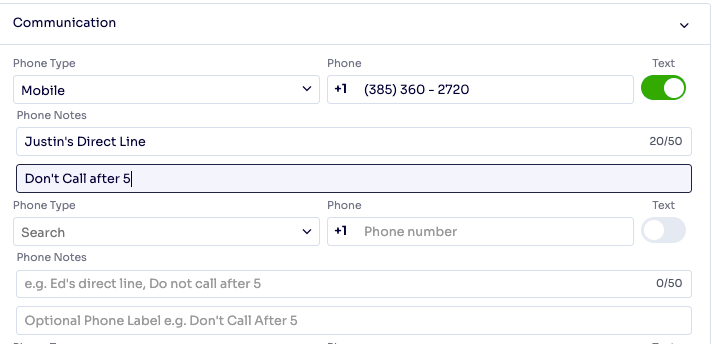
- AJTA-19910 – Phone Notes Field Added to Preserve Legacy Contact Notes: Added backend support for a Phone Notes field that preserves alphanumeric content previously stored alongside phone numbers, ensuring no contextual notes are lost during account migration.
- AJTA-20339 – Customer Address Saves Without Error When 'Address Required' Setting Is Disabled: Resolved an error that occurred when saving a customer or address while the 'Customer and Job Site Address Required' setting was disabled.
- AJTA-20647 – Address Autocomplete Now Respects Configured State Filters: Resolved an issue where the address autocomplete ignored configured state filter settings and returned suggestions from all states.
- AJTA-19891 – PO Item Deletion Now Blocked When Deliveries Exist: Resolved an issue where deleting a Purchase Order item with existing deliveries showed a warning but still completed the deletion. The warning now correctly prevents the action.
- AJTA-19892 – Inventory PO Unit Cost Now Populates When Created from Inventory Stock: Resolved an issue where creating a Purchase Order via the Inventory Stock action left the Unit Cost and Total Cost fields blank on the generated PO.
- AJTA-21013 – Preview PO Subtotal and Total Now Display Correctly: Resolved an issue where the Subtotal and Total fields in the Preview Purchase Order section were not displaying values after entering valid order details.
- AJTA-21014 – PO Item Deletion No Longer Shows Success Toast When Blocked: Resolved an issue where attempting to delete a PO item linked to deliveries blocked the deletion correctly but also showed a success message simultaneously.
Settings & Configuration ⚙️
- AJTA-20797 – User Permission Changes Now Save Correctly: Resolved an issue where user permission updates were failing to save due to a validation error.
- AJTA-21238 – Admin User Login No Longer Shows Permission Warning: Resolved an issue where logging in as the Admin user triggered a permission warning and caused the User Admin Panel to fail to load.
AR / Payments & Invoicing 💳
- AJTA-19817 – Prepayment Re-Export Now Available in Customer AR: Resolved an issue preventing prepayments from being re-exported from Customer AR when a previous QuickBooks log entry already existed for that prepayment.
- AJTA-20798 – Credit Memo Export Now Completes Without Error: Resolved an issue where exporting a credit memo failed silently due to a null reference in the export handler.
Messaging & Communications 💬
- AJTA-20668 – Communication Settings Report Option Reverts Correctly After PDF Toggle: Resolved an issue where disabling the 'Do not include PDF' options in Communication settings permanently set the Report option to 'None' without reverting when re-enabled.
Reporting & Analytics 📊
- AJTA-20604 – Inventory Type Filter Added to Inventory Sub-Reports: Added the ability to filter Inventory sub-reports by Inventory Type in Business Reports, allowing users to narrow results to a specific inventory category.
- AJTA-21272 – Optimized Crew Clockout Database Performance: Improved the performance of the crew clockout process by batching database operations, significantly reducing the number of database queries required per clockout session.
✨ Notable Feature Enhancement:
- AJTA-19911 – Phone Notes and Label Fields Added to Customer Profile: Added Phone Notes and Phone Label fields to the Customer Profile, allowing users to view and enter notes associated with phone numbers (e.g., 'Don't Call After 5'), including data migrated from legacy records.
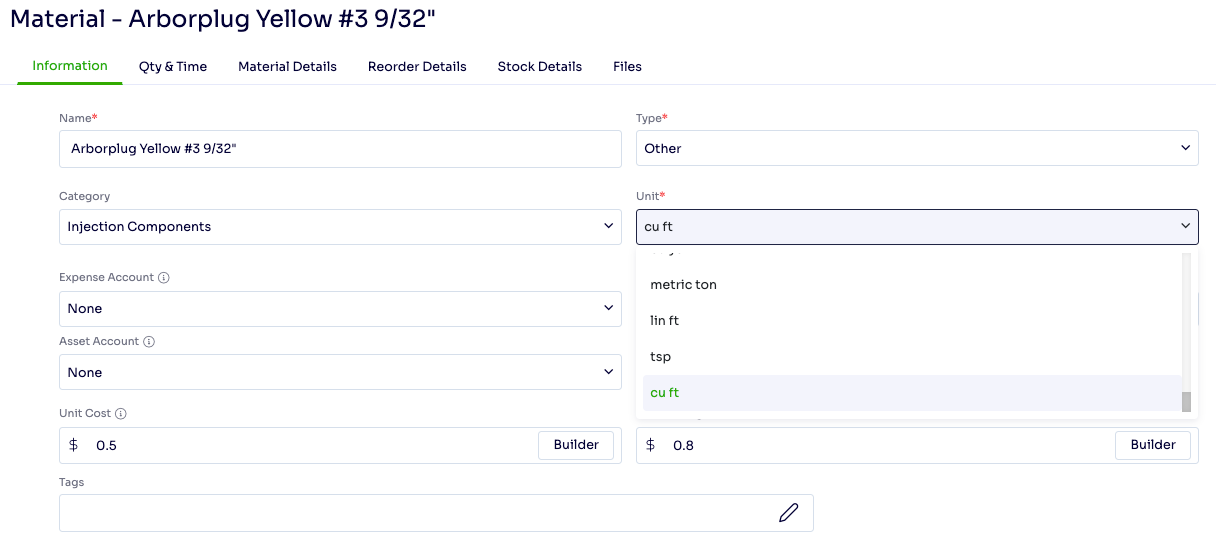
- AJTA-16990 – Cubic Feet Added as a Material Unit of Measurement: Added cubic feet (Cu Ft) as a selectable unit of measurement in the materials list, giving users more flexibility when configuring service resources.
- AJTA-21066 – Proposal Merge Fields Now Show Job Names in Communication Modal: Resolved an issue where Proposal merge fields displayed only job links without the job name, making it unclear which jobs would be included before sending.
We value your feedback! If you have questions or encounter any issues, please reach out to our support team.