![arborgold-logo-@250px copy.png]](https://help.arborgold.com/hs-fs/hubfs/arborgold-logo-@250px%20copy.png?height=40&name=arborgold-logo-@250px%20copy.png)
Overview
Required Customer Fields lets users with Admin permissions make Tax Level, Customer Class, and Ad Source mandatory, so every customer record is complete before it can be saved.
When these fields are left blank, the effects add up: customers can be billed the wrong tax, QuickBooks classes become inconsistent, and marketing reports can't show which channels bring in work. Making a field required closes that gap at the source.
- Tax Level: supports accurate tax billing, especially if you operate across several tax jurisdictions or states.
- Customer Class: keeps QuickBooks classes standardized.
- Ad Source: keeps marketing and campaign tracking reliable.
- Who can change it: only users with Admin permissions. The three Require toggles aren't visible to other users.
- Where it lives: Settings (gear icon) > Company > Settings > Customer.
- Your choice, field by field: each of the three requirements is its own toggle. Turn on one, two, or all three. Changing one never affects the others.
- Your account only: these settings apply to your company's account and no one else's.
- Default: all three are off. Until you turn one on, customer records save the same way they do today.
You choose which fields to require. All three settings are off by default, so nothing changes for your team until you turn one on.
Before you begin
- Who can change it: only users with Admin permissions. The three Require toggles aren't visible to other users.
- Where it lives: Settings (gear icon) > Company > Settings > Customer.
- Your choice, field by field: each of the three requirements is its own toggle. Turn on one, two, or all three. Changing one never affects the others.
- Your account only: these settings apply to your company's account and no one else's.
- Default: all three are off. Until you turn one on, customer records save the same way they do today.
How to turn on required fields
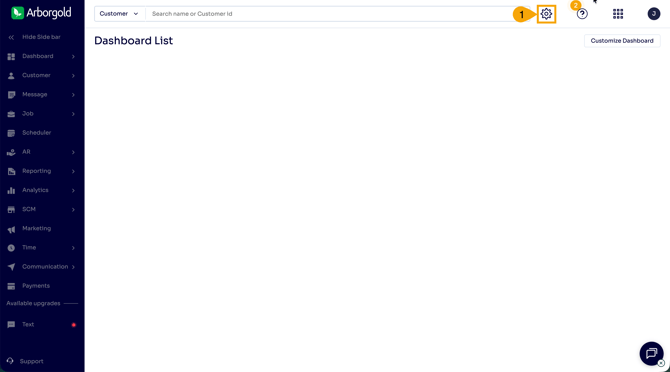
Step 1. Click the Settings (gear) icon in the top right corner.
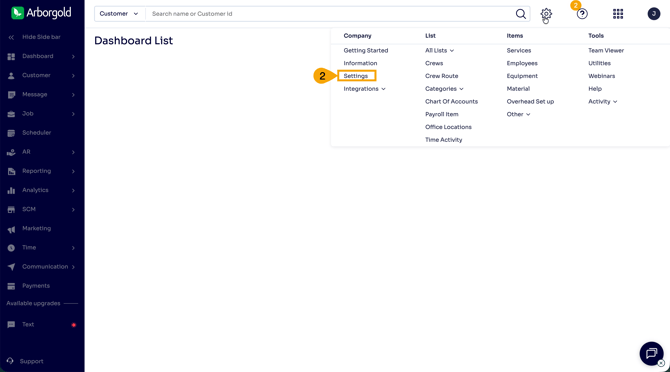
Step 2. In the menu, under Company, click Settings.
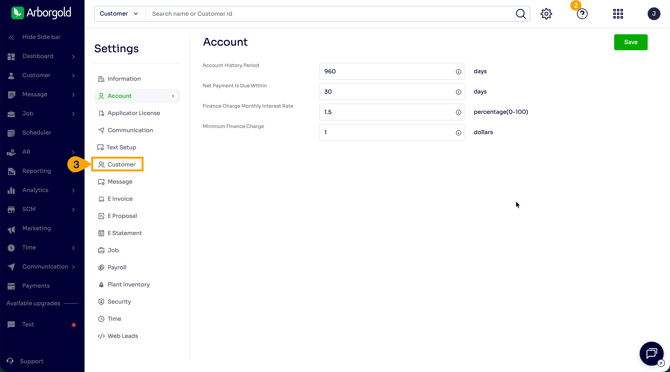
Step 3. In the Settings menu on the left, click Customer.
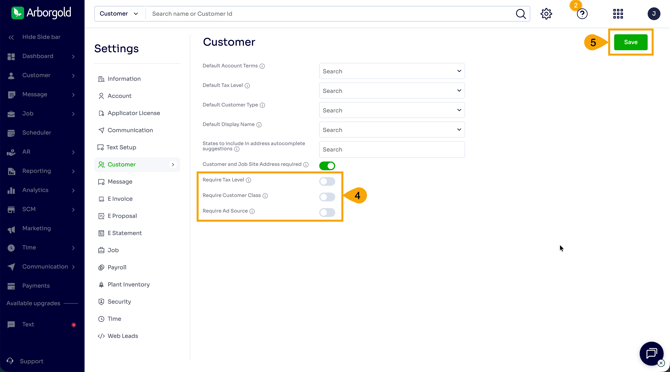
Step 4. Switch on the fields you want to require. Each has its own toggle:
- Require Tax Level
- Require Customer Class
- Require Ad Source
A green toggle means the requirement is on. A gray toggle means it is off.
Step 5. Click Save. The change takes effect immediately.